On December 18, the new Sip Club, hosted by Expandable Software, MIE Solutions and the Mirador Software Group, was pleased to host over fifty professionals for a Holiday Show and Tell session. Although we typically have one topic expert leading the discussion, December’s Sip Club was a bit different. Instead of a presentation or panel, we invited a few Users to show off one of their favorite reports, dashboards, or KPIs, that help them better understand their business or make key decisions and keep their operations running smoothly.
The Sip Club welcomed Clay Tallon, Engineering Manager from Qualex Manufacturing, Sean Duffy, Supply Chain Supervisor from Cardinal Health, Jonathan Nordquist, General Manager of Horizon Manufacturing & Repair, Michael David, President of David Engineering and a special guest appearance by Bill Haynes, General Manager for North America for Mirador Software Group
The indicators and dashboards shared were proprietary and Company-specific, and included specifics related to production scheduling, order status, detailed business forecasting and Customer Engagement data. While reviewing these metrics, several common themes emerged.
What are Users doing to support their businesses with Key Performance Indicators (KPI’s) and Dashboards?
Standard Metrics vs. Custom Metrics
Although many if not most ERP systems now have imbedded Dashboard capabilities, it is important to focus on the few key metrics that drive the business as opposed to the many “standard” metrics that systems “know” and can readily generate. In some cases, a key indicator may have to be derived using multiple data elements captured in the ERP.
In the case of MIE Solutions, MIE Trak Pro offers many features to help management teams stay ahead of production needs. One of the most popular options comes in the form of Quick Views. These powerful and highly customizable reports can provide greater insight into important business and production metrics and can be tailored to suit your team’s specific needs.
Expandable Software has three pre-built dashboards: Operations, Sales, and Finance. Users can begin using informative and interactive dashboards, with minimum training, upon deployment by using the included pre-built datasets. If additional dashboards are created and deployed, those dashboards will become instantly available to the users authorized to view those dashboards.
Data has to be Available in the System
A key criterion, however, is that the data you want to track has to be captured and exist in your system. You can’t report it if you don’t track it. This may mean using custom fields and input screens to collect the data you need.
Push Back from the User Community
There can be push back from the User Community whenever you create new metrics or reporting methods, particularly when some Users have been collecting and reporting data from offline sources or systems that they have been personally maintaining. In one large multi-billion multi-national Company, they had four separate User-generated systems reporting Bookings, Billings and Backlog, and all generated different answers, none of which matched Financial reporting. Eventually they were replaced with a single system that did match the Financials, but the hue and cry from the Users was significant when their personal systems were eliminated.
“Single Source of the Truth”
This is an absolute requirement and must be supported by Leadership. Without this, you get fractured and inconsistent data, which leads to innumerable problems and debates. If Leadership allows multiple sources of data, the credibility of all systems is questioned.
Data vs. Information
This is an important distinction that is often overlooked. Data is just that – DATA. Information is data that has been synthesized and analyzed to make it relevant to the User. Pages full of numbers are not particularly useful to Managers; more often or not it will just be discarded. Data that has been synthesized so a Manager has something tangible to act on IS useful. In one Company, a Manufacturing Manager described it this way: “Every quarter, Finance drops a phone book on my desk [reports full of data] and tells me I’m a butt. By the time I get through it all, the next quarter is over and I’m a butt again.”
What’s Next?
All of the individuals presenting their KPI’s shared one common comment: “This is just the beginning.” They all saw the need for ongoing development and continuous improvement. The most common direction is to incorporate AI to assist with the synthesis and analysis of data to be able to generate better predictive analysis of what might happen and recommend corrective action if needed.
KPI’s vs. KPD’s – Key Performance Drivers
In recent years, there has been discussion of something beyond KPI’s – Key Performance Drivers (KPD’s).
Key Performance Drivers or KPD Metrics are an important concept for improving operational performance and hence business results. A KPD is a measure that directly affects a business outcome or achievement of a KPI. [1]
KPD Metrics can be:
A leading indicator or early warning that a situation exists that if not addressed will lead to a poor result, such as Customer Satisfaction as a leading indicator of Customer retention.
A performance metric that is associated with a preceding step in a value stream or business process, such as Lead Time as a driver for On-Time-In-Full Shipments KPI.
A metric that contributes directly to a KPI and may be a component in the way a KPI is calculated such as Unit Sales, Average Selling Price and Direct Cost supporting a Gross Margin KPI.
In the simplest terms, a KPD is the action that makes the KPI move in a positive or negative direction. If “Speed” is your KPI for driving, the KPD’s are pressure on the accelerator to go faster, pressure on the brake to slow down.
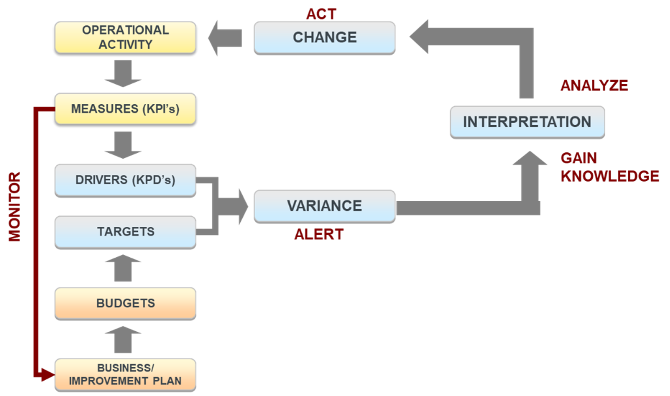
KPD metrics can be used as a part of a closed loop continuous improvement model
Monitoring measures drivers against targets, goals and best practices, identifying issues, understanding the nature of the issues and ultimately identifying corrective action as needed.
KPD metrics must be actionable to positively impact business outcomes
Measured against a goal or best practice
Monitored frequently so issues can be identified and corrected quickly
Assigned to an Owner who is responsible for results AND has the authority to take action
A Closed Loop Model Using KPD’s
Thanks and credit to all our Sip Club Participants and Presenters — Clay Tallon, Sean Duffy, Jonathan Nordquist, Michael David, and Bill Haynes — for their contributions and insights for the Sip Club.
Sip Club is a monthly, online knowledge-sharing event sponsored by Mirador Software Group and its subsidiary Companies. It’s designed primarily for our Customers – Manufacturing Professionals in Operations, Finance, and IT roles. Each session offers a safe space for our community to learn from one another, exchange ideas, and gain fresh perspectives from industry leaders.
Jeff Osorio is a Consulting CFO with over 40 years of experience in operationally oriented companies
ranging from pre-Revenue to $4B with over 40 ERP implementations in his portfolio. He is also an Adjunct Professor in the MBA program of the Leavey School of Business at Santa Clara University. https://www.linkedin.com/in/jeff-osorio-1412181/
Let’s face it; ERP evaluations, if done correctly, are extremely time consuming and often quite tedious. Hopefully, you have narrowed your ERP vendor list to a manageable few before you engage in a full blown demo with your extended team. Experience has taught me the time required for an overview demo is typically one hour. However, to complete a robust ERP demo is typically going to take a minimum of 4 hours and can, depending on the particular situation, easily take another 2-3 hours. Given this, I recommend that your full demo schedule should be limited to no more than the three ERP systems that made your shortlist.
Given the time commitment and importance of having a solid demo, clearly communicating your objectives for the demo to the vendor and the company’s attendees, in order for you and your team to be focused and can evaluate each finalist consistently. While there may be other objectives to consider, the final list really needs to include all the below items.
There is an adage regarding the three most important things to consider for successful real estate investing and opening a retail store or restaurant being location, location, and location. If the location is wrong, then the rest doesn’t matter. For ERP systems the three most important things for an ERP system selection are functionality, functionality and functionality. If the system cannot demo your required functionality in a manner that will work for your company, then the vendor needs to be eliminated from further consideration.
Therefore, the number one objective for any ERP demo is to determine if the functionality that you require to run your business exists can be demonstrated.
Functionality matching your ERP requirements: There are many things you cannot determine from a demo, including the quality of the application, the quality of the vendor’s customer support organization, and the scalability of the ERP system. However, you can clearly determine if the functionality that you require exists. All you have to do is ask to see it. The remaining objectives of the demo are all about understanding as much as you can about the company that will be supporting you during and after the go-live event. In some cases, it will be the ERP system company itself. Alternatively if might be an ERP system reseller that will be providing supporting. While the benefits of having direct support from the ERP system company itself are important, that topic is for another discussion as the remaining two objectives for the demo are almost the same.
Understanding your business: Does the ERP system company understand your specific business requirements, business model and your industry? Can they provide insights into your known issues as well as insights into issues with which you are not even aware that you have or will encounter in the near future? In essence, the ERP system vendor should know enough about your business to provide a very relevant demo and act as a catalyst for thought provoking discussions. If the ERP system company doesn’t “get it” when they are in the sales cycle trying to win your business, how likely are they to spend the effort after they win your business? Without understanding your business, they will have a tough time fully grasping the issues that you &/or your industry encounter. This will severely limit their ability to be an effective business partner and recommend best practices. In addition, if the industry knowledge is lacking, the likelihood their R&D product roadmap covering features and functionality important to your company and your industry will be greatly reduced. If you are considering using a reseller, the one difference to consider is that if the reseller does not understand your business well enough, will they be strong enough advocates to the ERP system company to champion roadmap features and functionality that are important to you?
Problem Solving/Listening: During the demo it is important to try to see evidence that a problem solving culture exists in the ERP company presenting. Are they really listening and are willing and able to discuss unique functionality or processes that are, will or might become problematic in the near future? Can they provide answers during the demo or even after the demo (once they have had a chance to discuss the issue more back at the office)? Do they quickly respond to all follow-up questions? The discovery objective is to try to determine if the ERP company has the DNA to make your problems their problems; i.e.be a strong business partners that won’t disappear once the sale is made. This objective should be followed up by reference checking for validation, but first-hand evidence might be a good indicator as well.
Wouldn’t it be nice if there was one managerial style that you can use for your staff as well as your supervisor? Well, there is; it is called flexibility or adapting to the particular person for a particular assignment.
There is a widely accepted theory based on a learning process model that has four stages (along with my very simplistic definition for each stage) that is listed below:
Unconsciously Incompetent (Stage 1): Do not know what you do not know
Consciously Incompetent (Stage 2): Know what you don’t know
Consciously Competent (Stage 3): Know how do it, but you have to think about it
Unconsciously Competent (Stage 4): Know how to do it without thinking about it and can see a few steps ahead
While these stages are very interesting, the real value is around using these stages to adjust one’s managerial style for each individual on your staff and which Stage they are in while working on their current assignment(s). For instance, if you had a newly hired employee that had minimal or no relevant experience in the area required for their current tasks (Stage 1 of the learning cycle), the best managerial approach would always be directive with minimal coaching. In essence, since the employee does not know what they don’t know regarding the assignment or with the company’s appropriate policies and procedures, it will be necessary to tell the employee what to do, how to do it, why they are doing it, and why they are doing it this particular way. This approach will facilitate the job to be completed correctly, on time, and teach the employee to enable their progression to Stage 2 for this task.
On the other side of the spectrum, let’s assume the employee assigned to the task has been with the company for a long period of time as well as having previously completed the same assignment numerous times; i.e. in Stage 4 of the learning cycle. In this instance, the managerial approach applied has to be completely different if you want to avoid undesirable outcomes least of which are being labeled a micro-manager and running the risk of completely demoralizing the employee as they easily can reach a conclusion that you don’t trust them to do the job by themselves.
Given the two extreme examples above, always consider the particular situation before deciding which managerial approach to use whether it is Directive (Stage 1), Coaching (Stage 2), Supporting (Stage 3) or Delegation (Stage 4). This thought process should be used for each assignment, because an employee might be in Stage 4 for one assignment, but in Stage 2 for a different assignment. The ability to be flexible and adjust your managerial style for each specific situation will make you a more effective manager and your staff’s productivity and morale will be the beneficiary.
On another level, you should use the same approach to manage your supervisor, if you feel they are “playing in your sandbox” too often. If you had a discussion with your manager on this subject, they might be willing to take a step back and change their approach. If however, they continue to micro-manage you, I suggest asking your manager why they don’t trust you to do the job as you believe that you are in Stage 3 or 4 of the learning cycle. If the answer is not satisfactory, then you most likely have a manager who only has a single managerial approach called micro-managing. In this instance you have to decide whether to “tough it out” until you change managers, try to find another position in the company or at a different company.
Wikipedia: http://en.wikipedia.org/wiki/Four_stages_of_competence Purchasing: By providing the ERP system with approved ECOs and new product design BOMs, the Purchasing department will be in position to modify their inventory purchases to account for the change in the BOM. In fact, the ERP system itself should be able to provide a purchasing employee with a warning if they are entering a purchase order for an inventory part that has a ECO that has been approved. These two examples serve to highlight the power and the importance of solid integrations between applications where the information in one of the applications is important to users of another application.
The value of presenting properly cannot be understated. This is your chance to be viewed as a significant value added member of the team and demonstrate your level of expertise.
Over the years, the below practices have worked extremely well for me. In addition, my observations of other presentations where the presenter did not fare very well was due to not following one or more of these practices.
1. Know your audience
As with any presentation, this is extremely important. Your entire presentation material and presentation style depends on your audience. For instance, a presentation to the Board of Directors would be vastly different in terms of slides, detail, preparation and context than a presentation given to a large group of other finance people.
In addition, a smaller group presentation will be subject to more interactions and therefore knowing each individual attendee can be just as critical. Using the Board of Directors presentation example again; knowing each board members tendencies, mannerism (indications of silent clues of agreement or disagreement), and overall knowledge or bias on a particular topic will help make a presentation go smoothly. The key is to avoid being blindsided by an objection, question or being forced to go down an unexpected path which can abruptly turn a smooth meeting into a very contentious meeting.
2. Know the material backwards and forwards
The presenter needs fully understand the material, any numbers and all the key trends, metrics and variances vs the plan or forecast. You do not want to be just reading the information off the slide. The audience wants to know the story behind the material or numbers. You need to provide the proper narrative as to any important events/milestone and the cause of any material issues or variances (both positive and negative). Are the issues or variances one-time events or will they be recurring?
The ramifications of the issues, depending on their importance, might very well be a topic of discussion By highlighting the possible consequences of not addressing the issue, will at a minimum, ensure the issues are discussed, monitored, resolved or optimally mitigated. Given this, you should be prepared to address the issue in some detail.
One last very important point for this section, if you don’t know the answer to a question, it is better to respond ”I don’t know; let me get back to you” or “I don’t know all the nuances to provide a proper answer, so let me get back to you” than it is to respond with an answer that is not correct. An incorrect answer will cause a hit to your credibility and everything you say after that as well as before that will become subject to suspicion with regards to its accuracy. Of course, you don’t want to be using the “I don’t know” response too often as that as its own negative implications as well.
3. Have answers to questions before they are asked
During preparation of the material, you need to be able to review the slides and ask yourself what questions are likely to be asked during the presentation. This is where knowing your audience and understanding the material and numbers come into play.
By reflecting on the slides, knowing the audience and the details well enough you should be in good position to review the slides and determine what questions are obvious and as well as what questions might surface. This will put you in position to present with confidence and to respond quickly. The better you are able to do this, the higher your credibility to the audience will be.
4. Issue Handling
Undoubtedly you will be in position to have to be the messenger of bad news. Depending on the situation (e.g., presenting to the Board of Directors), it is usually very wise to provide a heads-up prior to the meeting to the board members individually. This accomplishes two things: a) nobody likes negative surprises. By providing advanced notice, it will help control emotional responses during the meeting and b) It will give each Board Member to reflect on possible solutions or provide guidance during the meeting.
While presenting bad news cannot and should not be avoided, it is far better to present the problem, but then follow-up with action plans or possible solutions to solve the problem. In other words, don’t simply announce and give the problem to the attendees. Instead, demonstrate your leadership by owning the problem, whether as a team or individually, as appropriate.
5. Practice, Practice, Practice
This presentation adage has been around for a long time, because it is so valuable. The more important the presentation, the more practice is recommended. The benefits that practice provides include:
Cutting or rearranging slides if the material does not flow smoothly or does not paint the picture you are trying to convey
Provides the opportunity to deliver the presentation until you feel comfortable with the material, script and the message so you don’t have to read the slides. You want to face the audience and talk to the slides with confidence
Allows you to time your presentation assuming there are no questions. This will give you a sense if the number of slides or talking points for each slide needs to be modified so that your presentation can be completed in the time allotted